

Motion Detection Project
Use a PIR sensor to detect human movement and automatically switch ON an LED. This demonstrates the technology used in security systems, automatic lights, smart homes, and occupancy detection.
View Free Project →
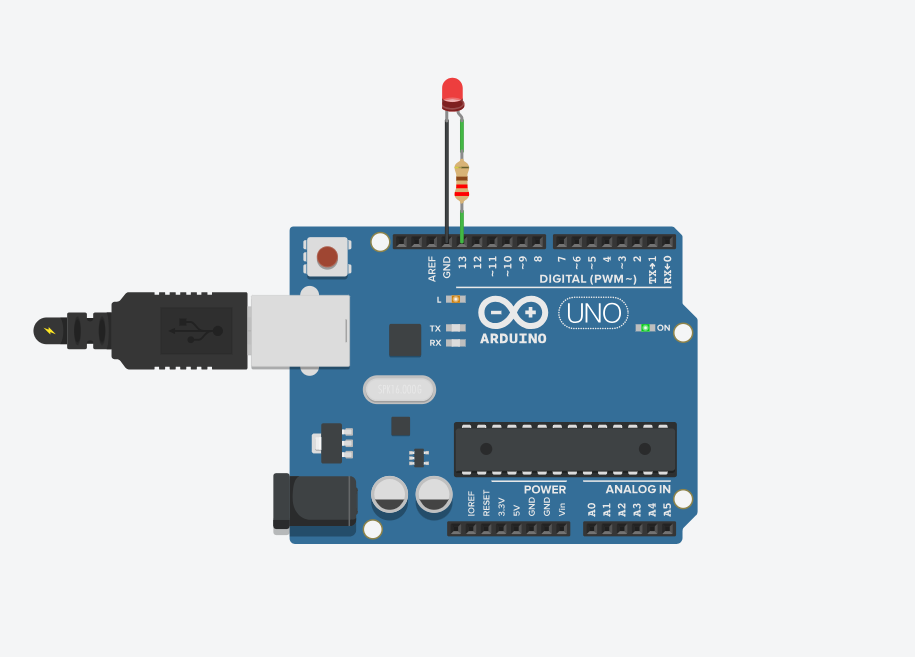
Learn how to control an LED using Arduino UNO by making it turn ON and OFF automatically. This is the basic concept behind indicator lights, warning lights, and signal systems used in real-world electronic devices.
Every step includes a visual reference and a plain-language explanation, so you always know what to do next.
Open the Arduino IDE, paste the sketch below, select your board and port, then click Upload. This code sets pin 13 as an output and blinks it every second.
void setup() {
pinMode(13, OUTPUT);
}
void loop() {
digitalWrite(13, HIGH);
delay(1000);
digitalWrite(13, LOW);
delay(1000);
}
Check the LED orientation (longer leg to pin 13 side) and confirm the resistor and jumper wires are firmly seated in the breadboard.
Re-select the correct board and COM/serial port under Tools in the Arduino IDE, and make sure the USB cable supports data (not charge-only).
Double-check you uploaded the sketch above and not an older one — an empty or unrelated program can leave the pin state unpredictable.
Loved building this for free? Our instructor-led workshops go deeper with kits, live guidance and more advanced builds.
Use a PIR sensor to detect human movement and automatically switch ON an LED. This demonstrates the technology used in security systems, automatic lights, smart homes, and occupancy detection.
View Free Project →Build a smart street light that automatically turns ON when it gets dark and OFF during daylight using an LDR sensor. This concept is commonly used in street lights, garden lights, parking areas, and energy-saving lighting systems.
View Free Project →Control an LED wirelessly using voice commands sent from a smartphone through Bluetooth. This introduces students to wireless control and smart-home applications, such as controlling lights, fans, and other devices remotely.
View Free Project →