

Robotics • FREE PROJECT

Voice Control LED Using Bluetooth

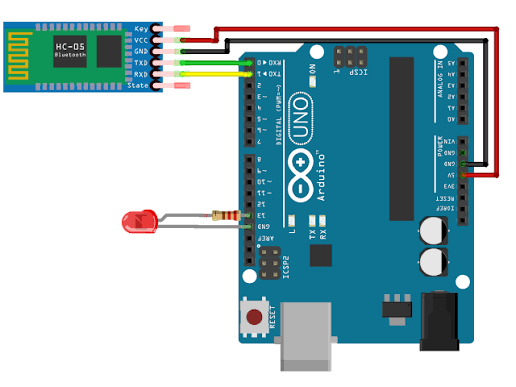
Voice Control LED Using Bluetooth circuit diagram
Intermediate Robotics ⏱ 75 Minutes

Control an LED wirelessly using voice commands sent from a smartphone through Bluetooth. This introduces students to wireless control and smart-home applications, such as controlling lights, fans, and other devices remotely.

What You Will Learn

  • Serial communication over Bluetooth (HC-05)
  • Parsing single-character commands
  • Controlling two motors independently
  • Pairing and using a Bluetooth controller app

Components Required

Arduino UNO R3 HC-05 Bluetooth Module 5mm LED 220Ω Resistor 1kΩ Resistor 2kΩ Resistor Breadboard Jumper Wires
BUILD IT STEP BY STEP

Follow along and build with confidence.

Every step includes a visual reference and a plain-language explanation, so you always know what to do next.

STEP 01

Upload the Code

💻

This sketch listens for single-character commands over Bluetooth serial: F (forward), B (backward), L (left), R (right) and S (stop).

cpp
#include <SoftwareSerial.h>

SoftwareSerial bluetooth(10, 11);

const int ledPin = 8;

void setup() {
  pinMode(ledPin, OUTPUT);
  digitalWrite(ledPin, LOW);

  Serial.begin(9600);
  bluetooth.begin(9600);
}

void loop() {
  if (bluetooth.available()) {
    char command = bluetooth.read();

    if (command == '1') {
      digitalWrite(ledPin, HIGH);
    }

    if (command == '0') {
      digitalWrite(ledPin, LOW);
    }
  }
}
STUCK ON SOMETHING?

Troubleshooting & common fixes.

Phone can't find the Bluetooth module.

Ensure the HC-05 is powered and its LED is blinking (searching mode); some modules need a first-time pairing directly from phone Bluetooth settings.

Car doesn't respond to commands.

Check TXD/RXD aren't swapped, and temporarily disconnect the HC-05 while uploading new code, since it shares the same serial pins as USB upload.

Car only goes forward, other commands don't work.

Confirm your controller app is sending single characters (F, B, L, R, S) and not full words or line-ending characters the switch statement doesn't expect.

WANT GUIDED, HANDS-ON HELP?

Bring this project to life with a mentor.

Loved building this for free? Our instructor-led workshops go deeper with kits, live guidance and more advanced builds.

Plan a Workshop →
KEEP BUILDING

More free workshops.

💡

LED Blinking Using Arduino UNO

Learn how to control an LED using Arduino UNO by making it turn ON and OFF automatically. This is the basic concept behind indicator lights, warning lights, and signal systems used in real-world electronic devices.

View Free Project →
📏

Motion Detection Project

Use a PIR sensor to detect human movement and automatically switch ON an LED. This demonstrates the technology used in security systems, automatic lights, smart homes, and occupancy detection.

View Free Project →
🛤️

Automatic Street Light

Build a smart street light that automatically turns ON when it gets dark and OFF during daylight using an LDR sensor. This concept is commonly used in street lights, garden lights, parking areas, and energy-saving lighting systems.

View Free Project →